 Up and Running
Everything your crew needs to get the show running
Setup that doesn't need you in the room
The run sheet taped up backstage, with the photo, the diagram and the how-to attached to the step that needs it. Built for whoever is standing at the console at 8:15am with coffee in one hand — paid crew, volunteers, or the one person who knows where everything is.
- Unlock the booth, house lights up
-
Amps last, always. Console and stage box first, wait for the desk to finish booting, then bring the amp rack up from the bottom switch. Powering up the other way round puts a thump through the PA that the congregation, the audience and the drummer all hear.
If the desk reports no stage box, check the Cat5 at the stage end before touching anything else.
- Patch channels 1–8 to the stage box
-
Wedges 1 and 2 angled in at the downstage edge, drum fill upstage right. Ring each one out on its own before you put anything else in it.
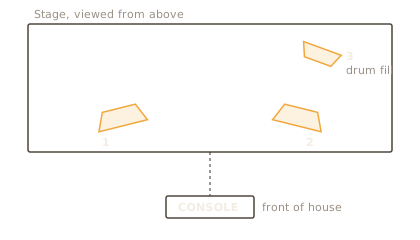
Monitor positions — a diagram, reusable anywhere in the project 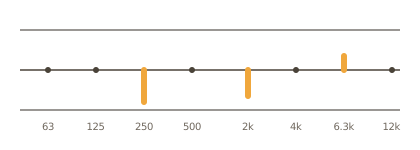
Last month's settings, for the same room and the same wedges - Line check every input
- Soundcheck at 4:30
Tick a number, or open a step to see what it carries.
A project holds everything for one event
Steps are numbered straight through the sections, so "step 7" means something when someone says it over a radio. Ticking a step turns its number into a check.
Checklists
Steps grouped into sections that fold away, each one carrying as much or as little as it needs: notes, links, files, a picture of the thing you are describing.
Docs
Reference pages for what doesn't get checked off — how the system is wired, who to call, what the room does when it goes wrong.
Diagrams
A drawing canvas for what a photograph can't show: where the console goes, what plugs into what. Edit a diagram once and every page using it updates.
Files
Every file the project uses, gathered in one place — not scattered across the separate steps that mention them, and not spread across the various cloud folders you currently have them in!
The explanation lives on the step
Write a step's details in Markdown and they travel with it — into the app, into the page you hand over, onto the printed sheet. Edit the left side and watch the right.
Your crew never has to install anything
Export a checklist and you get one web page that opens in any browser, off a memory stick, with the network down. Its typeface, pictures and diagrams travel inside it, and it prints as ink on paper.
Hand the crew the checklist
Export HTML
A single page that looks like the app: the progress strip across the top, sections and steps that fold, one switch for the pictures, and checkboxes that remember where they got to.
Move your work to another machine
Export project
The whole project — checklists, docs, files — imported into another copy of the app with the links between items intact.
Tutorials
Short, specific, written for the evening before the event rather than the week after.
Download
Free, and it works on its own machine with no account and no network.
Other downloads
Opening it the first time
The macOS build is signed and notarized by Apple. Drag the app into Applications and open it.
The Windows installer is signed. While the signature is new, SmartScreen may still show a notice; if it does, choose More info and then Run anyway.